
Prepare e-file IRS 1099 NEC, MISC, INT, DIV, R, A & K for 2026 File 1099 Forms Online
E-File IRS Form 1099-NEC Online for Tax Year 2026
Prepare IRS Form 1099-NEC to report qualifying payments to independent contractors and other nonemployees. Form1099Online provides online form preparation, bulk import, TIN Matching, and recipient copy options for supported filings.
Review your filing information, check the applicable IRS requirements, and register for an account to get started.
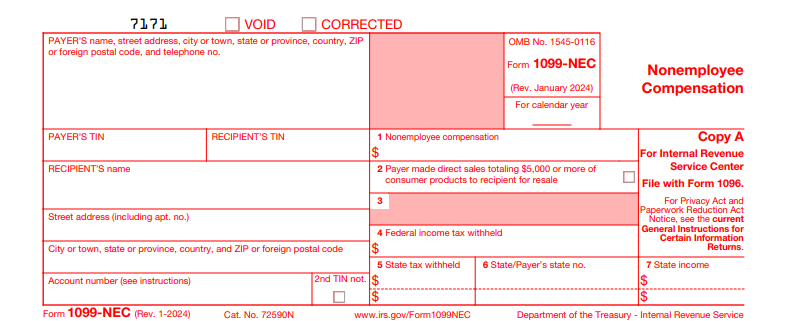
What Is IRS Form 1099-NEC?
IRS Form 1099-NEC, Nonemployee Compensation, is an information return used to report qualifying payments for services performed by individuals or businesses that are not your employees.
Businesses commonly use Form 1099-NEC to report payments to independent contractors, freelancers, consultants, and other eligible service providers.
For example, if your business pays an independent contractor $3,000 for qualifying services during 2026, you generally need to report the payment using Form 1099-NEC during the 2027 filing season. Employee wages are reported on Form W-2 rather than Form 1099-NEC.
Who Needs to File Form 1099-NEC for 2026?
Businesses and other applicable payers generally file Form 1099-NEC when they make qualifying payments of $2,000 or more to a nonemployee during the 2026 tax year.
The reporting requirement generally applies when:
- You make payments for services during your trade or business
- The recipient is not your employee.
- Your qualifying payments to the recipient total at least $2,000 during the calendar year.
- The payment is subject to Form 1099-NEC reporting under IRS rules
- Certain payments require reporting regardless of the amount when federal income tax was
withheld under backup withholding rules.
The reporting requirement can also apply to nonprofit organizations, government agencies,and other entities specified in IRS instructions.
What Payments Are Reported on Form 1099-NEC?
Form 1099-NEC reports different types of nonemployee compensation arising from business
activities.
1. Independent Contractor Payments
Payments for qualifying services performed by independent contractors, freelancers, or other
eligible nonemployees.
2. Professional Service Fees
Payments to accountants, consultants, architects, engineers, and other qualifying
professional service providers.
3. Commissions and Service Awards
Reportable commissions, fees, prizes, or awards paid for services performed by
nonemployees.
4. Attorney Service Fees
Qualifying attorney fees, including certain payments made to law firms operating as corporations.
5. Other Qualifying Compensation
Certain service-related payments, including incidental parts and materials, as specified in
IRS instructions.
Payment type, recipient classification, and applicable exceptions determine whether Form 1099-NEC reporting is required.
What Information Is Required to File Form 1099-NEC?
Gather your payer, recipient, and payment information before preparing Form 1099-NEC.
Payer Information
Your business name, address, and taxpayer identification number.
Recipient Information
The recipient's legal name, mailing address, and taxpayer identification number (TIN).
Nonemployee Compensation
The total amount of reportable compensation paid to the recipient during the 2026 calendar year.
Tax Withholding Details
Federal backup withholding and applicable state withholding information.
Additional Reporting Information
Relevant details for other applicable fields, including cash tips, occupation codes, and qualified overtime compensation where required.
Form W-9 is commonly used to obtain taxpayer information from U.S. independent contractors. Review the provided information before completing the return.
Form 1099-NEC Box Information for the 2026 Tax Year
Each Form 1099-NEC box reports a specific type of payment, withholding amount, or related detail. Complete the boxes applicable to your reporting requirements.
Box 1a: Nonemployee Compensation
Enter reportable nonemployee compensation, including qualifying fees, commissions, and payments for services.
The general reporting threshold for 2026 is $2,000, subject to applicable exceptions.
Box 1b: Cash Tips
Report the cash tips included in Box 1a when the applicable reporting requirements are met.
Box 1c: Treasury Tipped Occupation Code
Enter the applicable Treasury Tipped Occupation Code (TTOC) for the recipient's reported cash tips, when required.
Box 1d: Overtime Compensation
Report qualified overtime compensation included in Box 1a when applicable under the IRS instructions.
Box 2: Direct Sales of $5,000 or More
Select this checkbox when you made qualifying direct sales of $5,000 or more in consumer products for resale outside a permanent retail establishment.
Do not enter the sales amount in this box.
Box 3: Excess Golden Parachute Payments
Report applicable excess golden parachute payments according to the IRS instructions.
Box 4: Federal Income Tax Withheld
Enter federal income tax withheld under backup withholding rules, when applicable.
Boxes 5–7: State Information
These boxes provide space for applicable state withholding amounts, state identification information, and state payment amounts.
State reporting requirements may differ from federal requirements.
How to E-File Form 1099-NEC Online
Form1099Online provides an online filing workflow for preparing and submitting supported information returns. Follow these simple steps to get started.
Register for an Account
Create your Form1099Online account using the required registration details.
Select Form 1099-NEC
Choose Form 1099-NEC and the applicable tax year from the available filing options.
Enter Filing Details
Provide payer information, recipient details, and reportable compensation amounts in the appropriate fields.
Review and Submit
Check your prepared return, review the selected filing services and charges, and submit when the relevant tax-year filing service is available.
Access Filing Records
Sign in to review available submission records, filing status updates, and downloadable copies.
What Is the Form 1099-NEC Filing Deadline for 2026?
For electronic and paper submissions
For tax year 2026, the ordinary IRS filing deadline for Form 1099-NEC is February 1, 2027. The standard January 31 deadline moves to February 1 because January 31, 2027, falls on a Sunday.
IRS Filing Deadline
February 1, 2027For electronic and paper submissions.
Recipient Copy Deadline
February 1, 2027For furnishing Form 1099-NEC statements to recipients.
What Payments Are Generally Excluded From Form 1099-NEC?
Common exclusions include:
- Employee wages: Generally reported using Form W-2.
- Personal payments: Payments unrelated to a trade or business.
- Merchandise purchases: Payments for goods that are not reportable service compensation.
- Most corporate payments: Payments to corporations are generally excluded, although exceptions include certain attorney fees and federal agency payments.
- Certain card and third-party network payments: Payments reportable by payment settlement entities on Form 1099-K generally are not reported again on Form 1099- NEC.
Other exclusions and special reporting rules may apply. Review the IRS instructions based on the payment and recipient.
How Are Form 1099-NEC Copies Submitted and Distributed?
Copy A: IRS Filing
Copy A contains information reported to the IRS. Electronic filing does not require a separate paper Form 1096 transmittal.
Copy B: Recipient Statement
Copy B provides the recipient with details of the reportable compensation.
State Copies
Additional copies or separate submissions may be required under applicable state reporting rules.
Form1099Online offers downloadable forms and recipient delivery services. Review the available service options when preparing your returns.
What Happens If Form 1099-NEC Contains Incorrect Information?
A previously filed Form 1099-NEC may require correction when the reported information is incorrect.
Common corrections involve:
- Incorrect recipient names or taxpayer identification numbers.
- Incorrect nonemployee compensation amounts.
- Incorrect federal withholding information.
- Other errors in reported form details.
If you are the payer, review the applicable IRS correction procedure and submit a corrected return when required.
If you received an incorrect Form 1099-NEC, contact the payer and request a corrected statement.